released 17 Sep 2026 · Windows 10/11 · portable · needs git on PATH · served from GitHub until the site token is set
Unzip anywhere short-ish (GameMaker trees nest deep), run BloonsLauncher.exe. It clones the game's history (a few MB) and shows the timeline.
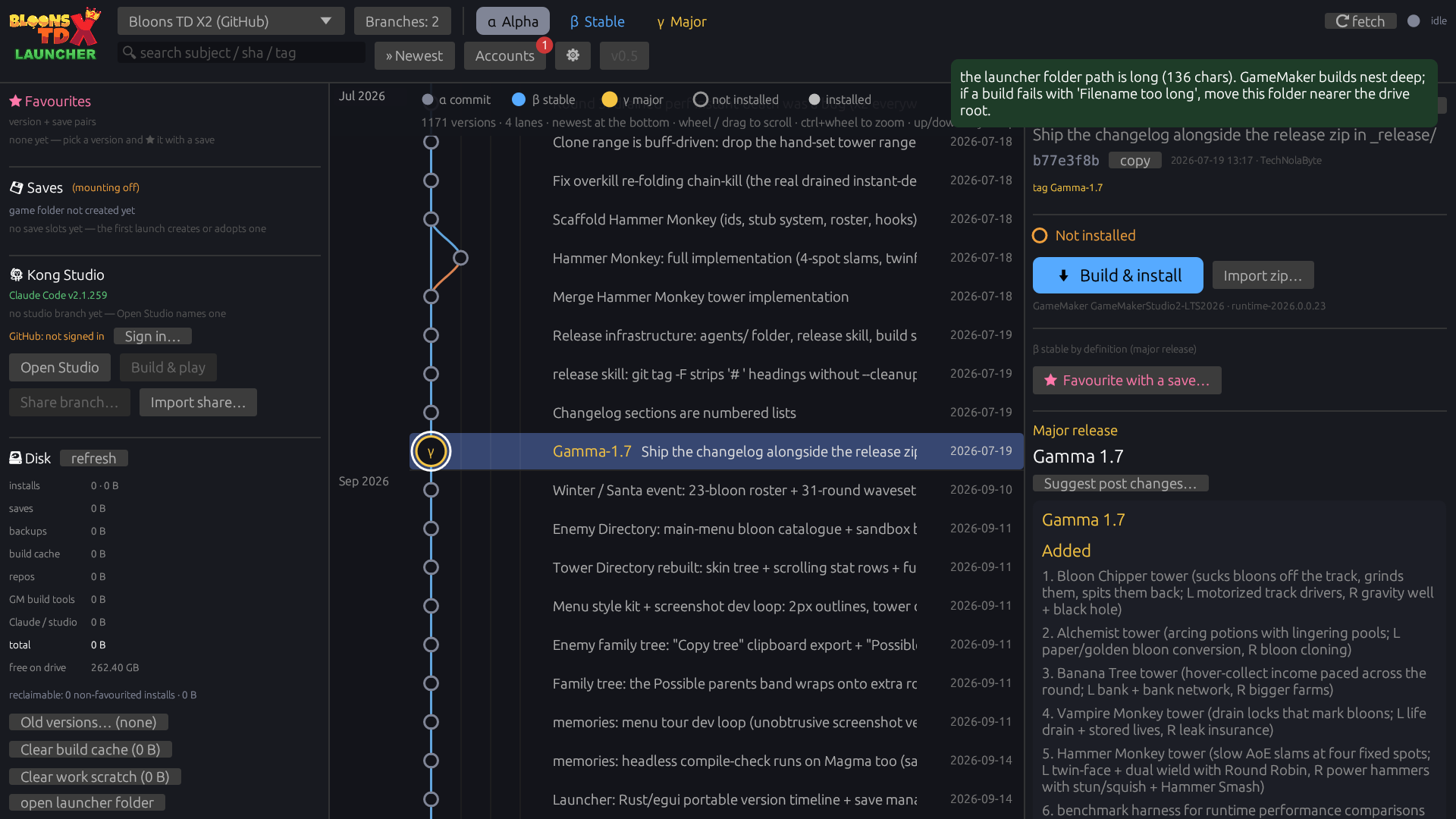
The launcher: version timeline, Kong Studio, disk manager.
The timeline
Newer versions appear at the bottom, scroll up to see older versions.
α
any commit (shown in the Alpha view)
β
a commit flagged stable (tick flag as stable on a version) or tagged Beta-*
γ
a major release: a Gamma-* tag; can carry an icon and a release post
Branches get their own lanes; edges show where a version came from. Wheel or drag to scroll, ctrl+wheel to zoom the row spacing, up/down keys step through versions, double-click plays an installed one.
Top bar: pick the repo, tick the branches to show, switch α/β/γ views, search. The dot at the top right is the network: it fetches the repo on start (and on click) and shows N new when versions arrived since your last visit.
Playing a version
Select a node → Play. The launcher asks which save to use:
Use an existing save — including the PRIME save (your main progression). Picking prime on an older version warns you, and a backup is taken first regardless.
Copy a save into a new slot — experiment on a copy.
Mint a brand-new save.
The chosen slot is zipped into backups\ and then linked into the game's save folder, so the game writes straight into saves\<slot>. When the game closes, the prime save is linked back. The first time the launcher meets a real save folder, it offers to adopt it as the prime slot (moved in after a backup).
Tick remember this version + save as a favourite and the pair shows up in the left panel. Favourited versions are never touched by Delete all non-favourited installs.
Build any version — no GameMaker install needed
Machines that never build can Import zip… a prebuilt release. To build versions yourself, run Set up build tools once: the launcher fetches everything into its own gm\ folder (~700 MB one-time) — the build tools, the game's runtime from GameMaker's public LTS feed, the prefab packages, and your licence file. No GameMaker IDE, and nothing lands anywhere else on the machine.
The one account step: sign in (or make a free account — non-commercial use is free) at gamemaker.io/account/access-keys, create an access key, and paste it into the setup dialog. The key fetches your licence and is not stored.
Versions pin their GameMaker runtime, so building an old version fetches the runtime it was written for, automatically.
Kong Studio — make content with Claude
The left panel's Kong Studio section turns the launcher into a modding workbench: Open Studio names your own branch and opens King Kong 🐒 in a checkout of it inside this folder, you say what you want in plain words, and Build & play puts it in front of you. Share branch… hands your commits to Duck.
Accounts (top bar) is the one-stop connection panel: GameMaker (build licence), GitHub (sign-in — sharing, submissions, shared version metadata), Claude (Kong Studio), and optionally Grok for the sprite assist.
Updates & disk
On start the launcher checks for a newer launcher and offers a one-click update that swaps itself after the window closes. The left panel shows what the launcher folder uses (installs, saves, backups, cache, repos) and how much deleting the non-favourited installs would reclaim. Nothing is deleted without asking; deleting an install never touches saves and any version can be rebuilt later.
Command line
BloonsLauncher.exe --list [alpha|beta|gamma]   print the timeline as text
BloonsLauncher.exe --install <rev>             build + install one version headlessly
BloonsLauncher.exe --fetch                     fetch the active repo and exit
BloonsLauncher.exe --root DIR                  use DIR as the portable root
BloonsLauncher.exe --play <rev> [--slot NAME]  launch an installed version with a save slot
BloonsLauncher.exe --self-update               apply a newer launcher if one is published
BloonsLauncher.exe --setup-toolchain [--access-key KEY]   install the build tools into gm\
Launcher changelog
From the launcher's release catalogue.
v0.9 2026-09-17 · dd4bfd81
Studio pane parity with the terminal: full tool calls with expandable results, a thinking toggle, AskUserQuestion cards, nested subagent (Task) calls, a status line with context/plan facts and light markdown
The studio box is always typable - queue a message while Kong is still working
Esc interrupts a turn, Ctrl+L clears, and / opens the skill helper
Every studio session is written to claude\studio-log\<session>.md as it happens
Open this session in terminal (and Take it back here) to continue the same Kong session in a console
Dock the game beside the studio, with an auto-dock setting
Sprite assist: per-category art-style prefaces, base sprite tiles, Remix with Grok, Add to project
File a bug report straight from the launcher
New commits default to your <id>+<login>@users.noreply.github.com identity, and Credits opens the site
v0.8 2026-09-16 · 9d8cdced
Kong Studio now lives inside the launcher window: chat with Kong, allow or deny his tool calls, Build & play and Reload with changes from the side column ("Open in terminal" keeps the console option)
One launcher window per folder: a second launch brings the running one to the front (and says so when Kong Studio is open)
Save management from the game's cloud button: back up now, copy into another slot, or relaunch in a different save — saves are tiles everywhere, no dropdowns
"Create new Gamma Release" beside the β flag: play-test attestation, suggested tag, then Kong runs /release and sends it up for review on bloons-tdx2.com (--build-release / --submit-release)
build.json beside every installed game so in-game bug reports know their commit; the game's news mark is fed from bloons-tdx2.com
Release-build warning reworded; the launcher page is now bloons-tdx2.com/launcher; the release catalogue reads even when double-wrapped; publishing tells the website
v0.7 2026-09-16 · ed769acb
Fixes Play doing nothing when your save folder was a real, never-adopted folder (the Adopt prompt was being swallowed)
Timeline dots now colour by state: green = built & playable, pink = favourite (grey outline = not built yet)
The game's console output now streams into the launcher log while it runs
New "Release build & play": an optimized, debug-stripped build for extra performance (with a heads-up that it has no in-game bug reporting)
Accounts is now a guided Device setup: numbered steps with status dots, one-click installers for Claude Code and the Grok CLI, sign-in buttons and links for every account you need
Kong Studio branches now start from the official new-engine line (not GitHub's master), with an offer to move a studio branch that was cut from the wrong base
The release browser reads the catalogue again (it was published double-wrapped and showed nothing)
v0.6 2026-09-16 · 113840c4
Release browser: fixed-height layout (it could inflate taller than the window)
Version button wears a red ! when a newer launcher is waiting, and opens on that release
"N new" badge now acts: click selects the newest version, scrolls there, clears the badge
Timeline marks your last-run and last-built versions with pills by the date column
A release the auto-updater already downloaded offers Switch instead of a second download
v0.5 2026-09-16 · cbd3a571
Disk management: "Old versions" dialog for gm runtimes (sizes, select-all, warnings when a favourite still pins one, delete-anyway allowed) + clear-cache buttons showing predicted and actual freed space
Updates go hands-off: a newer launcher pops up, installs itself in the background, then offers "Switch to Newer Launcher" / "I'll reload later"
GitHub sign-in shows the code big with one "Copy auth code and open github.com" button, and fixes a credential bug that could break quiet git auth
Grok is CLI-first like Claude (Grok Build detection + its own login); API key stays as the headless sprite-edit fallback
New launcher icon (game bloon + console badge), taller logo with green LAUNCHER (click = bloons-tdx2.com), "Open repo on GitHub" in the repo picker, Kong Studio monkey, README screenshot
v0.4.1 2026-09-16 · 7b9d6cb9
Accounts button shows a red attention badge; Grok counts as missing unless marked "Intentionally Absent" in Accounts
Click the logo to open bloons-tdx2.com; the repo picker gains "Open repo on GitHub"
v0.4 2026-09-16 · 3fb5aa13
Self-contained GameMaker build tools: one access-key setup, no IDE install (gm folder)
Kong Studio: King Kong the Monkey Commander (Claude) in your own branch, with in-game Show Claude / Reload-with-changes / commit tools